Tuesday, 21 October 2008

Proposal 3 - "Torn City Mobile" (TCMob)

Overview
To follow up on the idea suggested in Proposal 2, I propose to create a Java application for mobile phones that will give players of "Torn City" (TC) the ability to play the game from their mobile phones without having to worry about any mobile phone browser incompatibilities. Users would be able to do everything they usually do on their TC account, but as with Proposal 2, the middleman of the browser would be removed.


Reasoning
TCMob would be a highly popular application that any player of TC (that has a Java and Internet enabled phone) would want to have.

Players of TC cannot always get access to a computer to spend the certain points that they get throughout the day in-game, and so would welcome a way to be able to play the game without their computer. The players would also be far more encouraged to use a dedicated TC application, that is specifically designed for just TC, than experimenting with different mobile browsers that are well-known by TC's players to have issues with TC's cookie and session system.

TCMob would also readjust the elements of TC to fit appropriately on the reduced screen size of the mobile phone.

TCMob would be a separate Java application instead of just a mobile version of the TC website because it would be easier for users to obtain and use. It would also, as already mentioned, remove problems of incompatibility between mobile phone browsers.


Target Audience and Implementation
As with Proposal 2, this program would be targeted at the players of TC. The players of TC would also have to have knowledge of how to install Java applications on their mobile phones.

TCMob would be made to the standard required of Java enabled mobile phones. TCMob could also be developed for mobile phones that charge for their applications, such as the Apple iPhone.


Technical Details

TCMob would require mobile phones that can run .jar (Java) files. It would also require that the phone has internet access, and that the phone user gives the application permission to access the internet. The application would not have to access any of the phone's contacts or 'local' functions.

The application would be able to also cut out some middle ground on some features of TC, such as the 'bot' blocker security feature...


Torn City's 'bot' blocker feature, to stop automated programs performing some functions.

... instead of users having to scroll and click on the numbers, the user using TCMob would be able to just press the relevant number on their phone's keypad.

The software would also offer the option to remember login details (again, as mentioned in Proposal 2, would only be able to remember one set of login details to block multi-account usage).

Proposal 2 - "Torn City Manager" (TCM)

Overview
I propose to create a 'software extension' to a popular online browser-based game called "Torn City" (TC). The application would connect to the regular TC servers and use exactly the same data as is displayed in a browser. The application would use the regular code sent from the servers as a sort of 'feed' rather than a normal compiled page. The key focus of TCM would be customisation in the form of panels and styles, and the removal of the 'middleman' of a browser.


Current TC login page.


Reasoning
I think that TCM would be a popular application for the players of TC. The players currently have to go through somewhat of an effort to login and navigate the basic layout of TC, by having to go through launching their browser, navigating to the TC website, entering their login details and using a non-customisable layout.

TCM would offer the quickest and easiest way for players to login and play TC. It would also offer the customisability that the current TC does not. Players would enjoy the game more if they could choose what to display and how to display it, so as to cut out the features they don't use or find get in the way.

Customisable panels would be a great tool in TCM as it would let players arrange their layout how they want it, and where they want it, much like users can arrange their panels of tools in Adobe Photoshop. Styles would also be an improvement on the current TC system as users would be able to configure what colours or pictures they want for different functions. This could also be expanded to allow for entire themes, which could spark off a new community of theme developers for the game.


Target Audience and Implementation
This program would only be targeted at players of TC. However, it is also possible that the addition of an actual application would encourage non-players to play the game. The players would not have to be too computer literate to run TCM, but would have to be able to install or mount the application depending on what Operating System (OS) they are running.

TCM would have to be implemented on any OS for any spec. computer. As there would be players using all kinds of OSs, TCM would have to be implemented for as many OSs as possible.

If someone is playing TC then they would have to have a computer good enough to run a browser, which would show that their system specs. would be more then sufficient to run a program like TCM.


Technical Details

As mentioned above TCM would need to be able to be implemented on as many OSs as possible.

TCM would require internet access in order to run, as the program will need to connect to TC.

TCM would be able to have its panels detatched from the main window so that when the main window is minimised the panel still shows. (A good example of implementation would be if a player was bidding at an auction in-game, or wanted live updates of the TC stock market)

The software would be able to remember login details if wanted to, and would only allow the remembering of one account login, as multiple accounts are against the usage agreement of TC. (the program may even cut down the numbers of multi-account players)

Proposal 1 - "LANner's Toolkit" (LANT)

Overview
I propose to create an application interface that would enable users to easily switch between their regular computer operation and LAN party operation seamlessly and easily. The interface would completely separate the two 'modes' so neither one could affect each other. The program would also offer the same expandability and customisation of the regular operating system.


Original sketch of the basic interface.


Example of the possible interface showing the procedure to use LANT's main feature in the context of Windows XP.


Reasoning
I think the "LANner's Toolkit" would be a successful and popular application in the ever-growing LAN 'community'. As a 'LANner' myself, and having asked my 'LANning friends' it seems there is a demand for an application like this to be made.

Because LAN parties are so different to regular computer operation, a 'LANner' often has to change settings for their display, network, etc. and it would make life easier if these settings were available at 'less clicks away' than usual. The LANner's Toolkit would also make available 'handy' programs that LANners commonly use, but usually have to search or look for, such as pinging or ip configuration programs.

I believe that Regular and LAN mode should be as separate as possible because of how many changes a computer often has to go through at a LAN. Changes made at a LAN often create a huge difference between LAN and regular operation, and it can sometimes be quite 'lengthy' to put those settings into play at the beginning of a LAN and reset them after the LAN has ended.

Although there are many programs similar to this (VirtuaWin, YODm3D), none of them successfully separate the desktops enough, or, of course, provide relevant 'tools' for LAN parties.


Target Audience and Implementation
This program would be primarily aimed at 'hardcore' LANners or just regular people attending LAN parties, even for the first time. However, it could also possibly be used by network administrators of large networks. These audiences suggest that LANT's users would only have be computer literate enough to install LANT, and that the options provided by default would be available to them easily, but aren't actually a part of LANT, and are certainly not required, instead, as already hinted at, they are recommended.

LANT would be made for the modern Windows PC (XP and above). It would feature the programs and options which are relevant to LANs and which are already included in Windows. LANT would be Windows only, as computer games all primarily run on Windows, and so people attending a LAN are likely to be running it. Other operating systems such as Linux or OSX aren't at all popular for gaming or LAN parties, and so are not worth implementing on or designing for.


Technical Details

LANT would be an 'extended' version of virtual desktop software. It would save settings of regular operation to its own files when LAN mode is enabled, so that when LAN mode is disabled, regular operation can continue immediately exactly as it was before, and visa-versa.

The software would give the option to be able to run on startup, and would include an icon in the system tray of Windows.

LANT would also display technical details on an overlay (configurable) on the desktop. These details could include system uptime, memory/network and CPU usage, computer's workgroup/name/IP address etc.

LANT could also include configurable hotkey shortcuts and combinations to perform actions or launch programs.

Tuesday, 14 October 2008

Brainstorming: Computer Games


After brainstorming is it clear there is no "ultimate" video game experience, and the idea of total immersion video gaming seems to be the only possible way to get "into" the game. Total immersion video games would:

- Tap into senses, respond accordingly
- Have a sedation effect to disable actual actions, use the subconscious to trigger "dream scenarios"

The idea of total immersion video gaming or simulation is a popular idea in Science Fiction, with certain possibilities for the technology playing a prominent role in the stories of shows such as Red Dwarf and Star Trek.

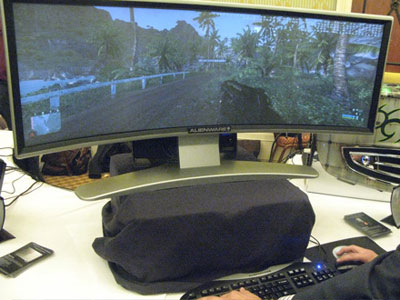
The visual outputs sketched in the brainstorm above are actually all currently implemented (albeit very expensive and not widely used). Here is the only example of the curved display...


www.hexus.net
Alienware's Prototype Curved Display


More information and media on this prototype can be found here.

Interface Future and Influences

Video and Computer games are a huge success, and evolve at the same rate that technology does. Video games gave their players a way of interacting with their entertainment like no other interface or film could, and so games have picked up a huge following, as detailed in the video below...


This video shows how video games are played by millions of people around the world, regardless of colour or gender. The video also details how people get attached to the video game, become emotionally involved with an interface. I think this is where every electronic interface will lead to, and everyone will be able to control their appliances or games just by thought.


www.cyberpunkreview.com
Humans plugged into the Matrix in The Matrix


The Sci-Fi ideas expressed in the Matrix aren't so much of a fantasy, it is not a question of "if we could get plugged into software", but "when we get plugged into software".

Thursday, 9 October 2008

Graphics in Interfaces

Interfaces have come a long way in both how they input and output. The last relevant topic to cover is Graphics.

The graphics used in interfaces keep evolving as technology becomes better and more efficient at showing colours and pixels. This of course means that interfaces never used to include graphics or symbols. With the introduction of screens in electronics, interfaces were basic and hardware was only just powerful enough to output 2-colour text...


Screen shot of the DOS Terminal in Windows XP

The Command-Line Interface (CLI) was a basic way of showing what you input to a computer and what the computer is doing. It was when computers got powerful enough to display graphics and colours where the interface of a computer really attributed to the PC 'boom' in the 1990s...


A modern colour-rich, high resolution theme in Windows XP

The Graphical User Interface (GUI) really took off on every electronic screen interface when it was introduced to the PC. The GUI made previously difficult interfaces simple to use for the user, and so more and more people considered using products that featured them.

GUIs are also continuing to evolve, now often featuring animation and 3D, as backgrounds or even as just the icons. GUIs will continue to evolve at the pace that hardware evolves, so that as components get more powerful, users will not have to sacrifice speed in order to get a graphically-rich interface.

Wednesday, 8 October 2008

Interface Simplification and Modularisation

As technology evolves, and more and more features are implemented, interfaces must adapt to the user's needs. This takes the form of simplification and modularisation.

Simplification
This reduction of options doesn't always mean a reduction of uses or features. It could mean the combining of functions or the reduction of steps to perform a function.

However, there is also reduction examples such as...


www.scan.co.uk
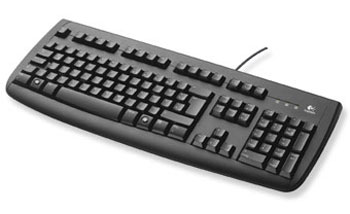
Logitech Deluxe 250 Wired Keyboard


Being reduced to this...


www.scan.co.uk
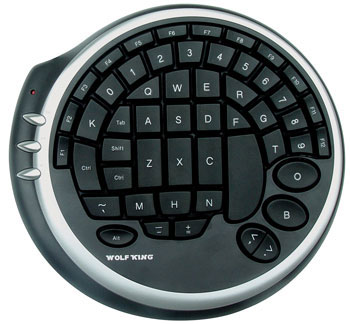
Wolf King DK-2388U, Warrior Black Circular Gaming Keyboard


Above we see a reduction of features of a regular qwerty keyboard, to make an entirely new interface that is simpler to use for a specific task. In this case it is PC Gaming. PC gamers don't very often need every key on a full keyboard, and so developers produced an interface that is ONLY suited to gaming (or any "avatar" control), and that only provides the essential keys needed.


Modularisation
The modularisation of an interface happens when there are many features available and options within the interface need to be broken up into groups or objects.


Image of the above qwerty keyboard edited to show modularisation.

A well implemented example is used in most regular qwerty keyboards. As highlighted in the picture above, the different groups of keyboard keys are grouped according to their collective function (typing keys, navigation keys, number pad, etc.). This is a simple example, but one that could improve a new user's understanding of they keyboard quicker than if it was not implemented. It should also be noted there is further modularisation within some groups, such as the top function keys, where rather than having all 12 grouped together, they are divided into groups of four.

Modularisation and simplification will continue to be implemented, but it is up to the interface designer when and where to implement them, as not every interface requires action.

Monday, 6 October 2008

The Scaling of Interfaces

In the past few years mobile phones have become an alternative for almost every electronic communication and entertainment device, with modern models incorporating everything from e-mail to video, and music playback. It is an area that is most notable for including more and more features and technology, while at the same time getting smaller and smaller.


www.celtnet.org.uk
Mobile Evolution


Of course, it is most notable that the 'hot' markets for interactive devices getting smaller are the ones for mobile technology. This is everything from mobile phones to laptops, etc. However, there is also somewhat of a 'demand' for regular appliances to get smaller, even for just aesthetic reasons.

But there is also a flip side to this. While the mobile market is getting smaller, the 'immobile' market is getting bigger and bigger.


http://randt.files.wordpress.com/2008/05/old_tv.jpg
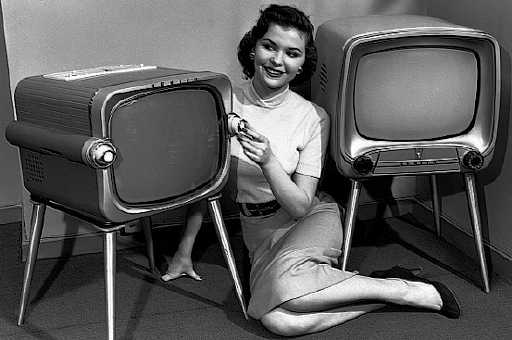
Old TVs


www.sfgate.com
"World's Largest TV" at CES 2007


TVs are getting bigger and bigger, including more colours, and more and more pixels. The demand for higher resolution and bigger displays has been around since the beginning of TV's 'legacy', and is not going away any time soon. Big TVs are now affordable enough to be in any living room, and are not just used as TVs any more... PCs and other electronics are often able to output to TVs, and so render large TVs as a sort of entertainment hub.

It has been widely reported that the laptop market is overtaking the desktop market at growth (source). So the future, it seems, will see the two ends of the scale form together, bringing the expandability and assets of large devices to a small and portable mobile device.

Friday, 3 October 2008

Initial Research

For the beginning of this research, it would be appropriate to concentrate on theories and 'movements' of interfaces, rather than actual implementations.

Areas discussed include:
  • Scale (how physical interfaces are reducing in size)
  • Simplification (how interfaces are having to be simplified to become more streamlined)
  • Modularity (how interfaces are becoming sectioned and categorised within themselves)
  • Graphics (how interfaces, and particularly virtual or screen interfaces, are including more and more graphics and icons/symbols)
It would be a good start to see how these areas are being implemented in today's interfaces, and look at what they evolved from. I will also only focus on the interfaces of electronics, the area that I am interested in.