

Image of Apple OSX Tiger from: imageshack.us
The above screenshot shows one of the more popular fashions amongst electronic screen-based interfaces. The fashion to put gradients on backgrounds and titles, 'gloss' and drop shadows on icons and buttons etc. , and anti-aliasing on edges and text is noticeable on many of today's OSs...

Image of Microsoft Windows Vista from: www.softwareinreview.com

Image of Apple's iPhone OS from: technabob.com
... and so could be considered a fashion. However, this is with good reason as any users that would be using the interface would feel pleased and able just by looking at the aesthetics. Things were very different 10 years ago...
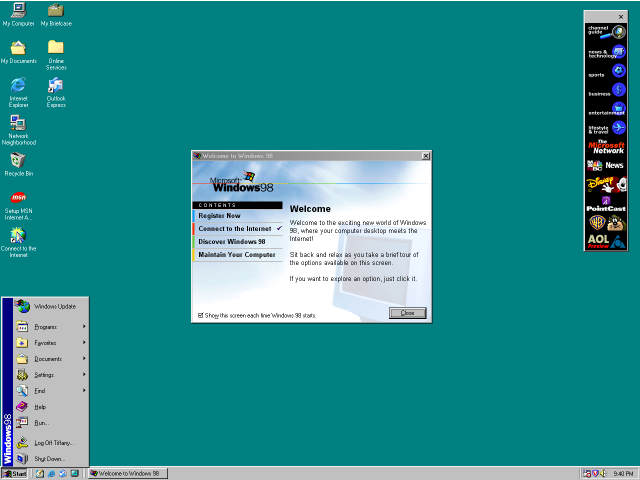
Image of Microsoft Windows 98 from: wikimedia.org
... as hardware was not powerful enough to efficiently show colour/effect rich graphics on even the most advanced home computers. It is visible in the screenshot immediately above that the GUI was not feature or effect rich compared to today's standards, but it is clearly visible how today's fashions have evolved from the GUIs of past years (there is evidence of the introduction of bevelling and gradients on some buttons and backgrounds).
The evolution of the GUI is now not drastically held back by hardware, and so can push in many directions. www.computerhovel.com has an illustrated time-line of the evolution of Microsoft's Windows Operating System, and is a good source to use to see how graphics were held back by the now dated hardware.
In the context of LANT, the program will not attempt to break any graphical boundaries, but instead try to integrate seamlessly into the Windows interface, using any system skin or theme the user has applied to Windows. However, because LANT is pushing for customisability, the users of LANT should have the option to change the program's appearance and presence in their system.

No comments:
Post a Comment